SanasVoz
Breaking language barriers for healthcare, legal, and financial consultations
Platform for professionals using Sanas AI SDK.
I built SanasVoz: A Platform for professionals where two people join a call, each picks the language they speak, and each hears the other translated live, in their own voice's cadence, without waiting for the other person to finish a sentence first.
I demoed it as a doctor talking to a patient, since that's the case I kept coming back to. A doctor who's excellent at their job is still out of reach for a patient the moment they don't share a language, and that gap shows up everywhere, not just in one country.
This post is the full architecture: how a call gets set up, how two strangers' browsers find each other, how the translation itself works, and where the audio actually travels at each point. I built it solo, using Sanas AI browser SDK for the translation itself and plain WebRTC for the call. If you've never touched WebRTC before, that's fine. I'll explain each piece as it comes up rather than assuming it.
The one thing that trips everyone up first: there is no "translator" in the middle
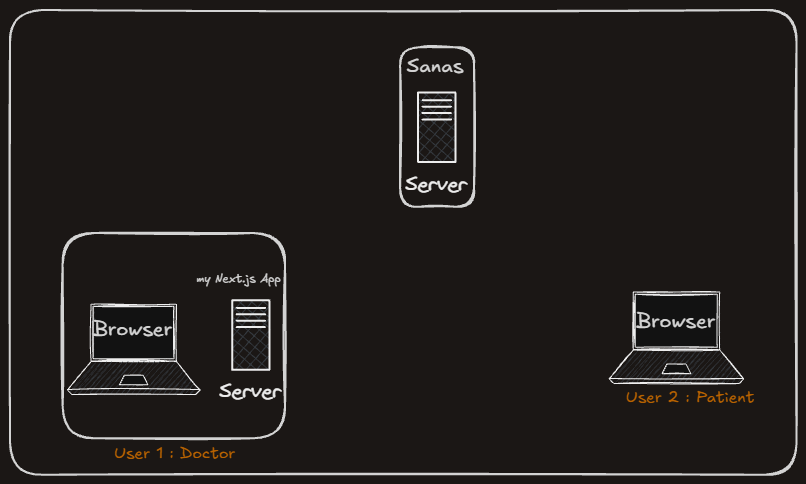
My first instinct, before building this, was to imagine one central thing sitting between two people, listening to both and translating both ways. That's not how it works, and getting this straight up front makes everything else easier to follow.
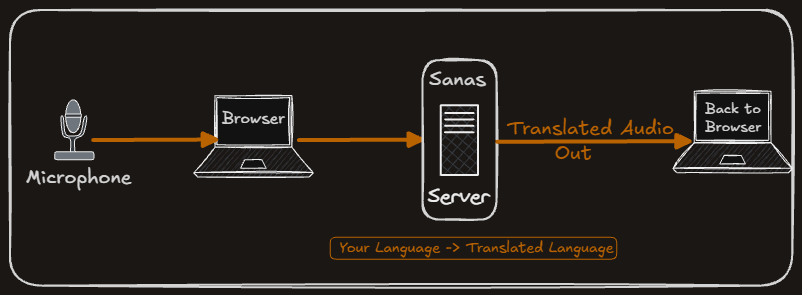
Each person's own browser handles their own voice, completely separately. Your browser takes your mic audio, sends it to Sanas, gets back audio translated into the other person's language, and hands that off to the other person's browser. The other person's browser does the exact same thing in reverse for their own voice. There are two separate translation streams running for one conversation, one per direction, and neither browser ever plays back its own translated output to its own owner. You only ever hear what arrives from the other side.
I mention this first because almost every other design decision in this app follows from it.
Step one: Starting a call doesn't touch a server at all
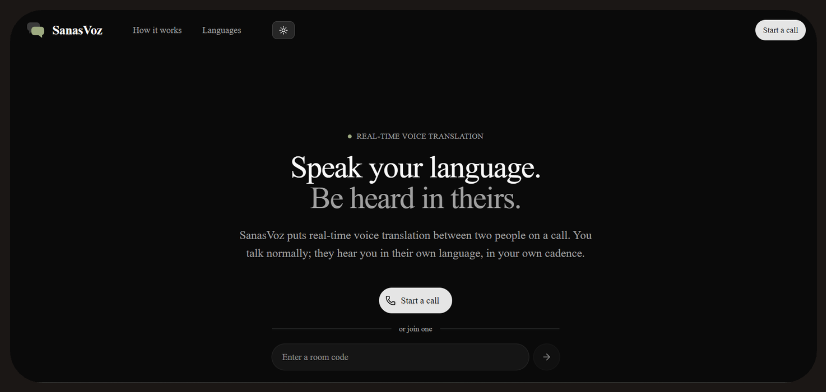
Clicking "Start a call" runs entirely in the browser. It generates a random code, right there in JavaScript, using the browser's built-in secure random number source, not a weaker one like Math.random, since this code doubles as the only thing protecting the room. It then redirects to /call/<that code>.
Nothing gets saved anywhere at this point. No database row, no server-side "room created" event. The code is just a string. A "room" only starts to mean anything once a browser actually connects to the server using that code, which happens a step later, when someone clicks Join.
The code itself is sixteen characters, drawn from a set of thirty-one (some letters and numbers are left out deliberately, since characters like 0, O, 1, l, and i get misread when spoken aloud or mistyped). Sixteen characters from that set gives an enormous number of possible codes, enough that nobody is going to stumble onto an active one by guessing. That length was a deliberate choice: since the code in the URL is the only thing standing between "just us" and "anyone who finds this link," it needed to be long enough that guessing it isn't realistic, without adding an actual login screen, which felt like the wrong kind of friction for something this casual.
Step two: The join screen, and why it exists as a separate step.
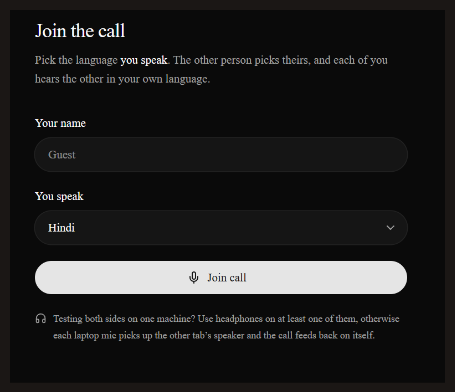
Visiting /call/<code> doesn't drop you straight into a live call. It shows a small form first: your name, and a dropdown for the language you speak. Nothing connects until you click "Join call."
This isn't just a UX nicety. Browsers require an actual user action, like a click, before they'll grant microphone access or play audio out loud. If the app tried to grab your mic the instant the page loaded, the browser would refuse. The Join button is that required click, doing double duty: it's the moment we ask for the mic, and it's also the gesture that lets the browser play the other person's translated audio later in the call.
Step three: Getting a translation token without ever exposing the real API key
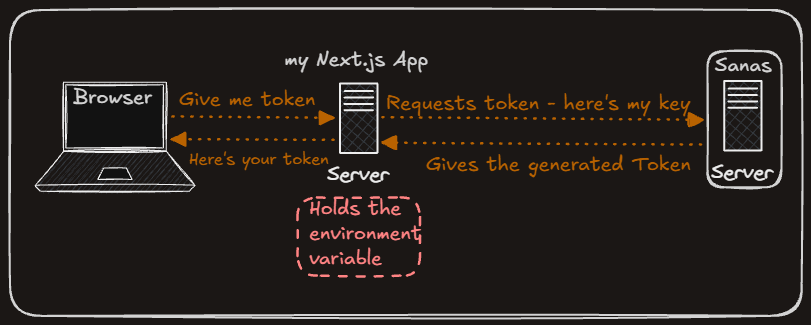
Once you click Join, the app needs to authenticate with Sanas somehow. The tempting shortcut is to put the API key directly in the browser code. I didn't do that, because anyone can open a browser's dev tools and read every line of JavaScript running on a page, including any key sitting in it. That key represents real money (translation credits), so it can't live anywhere a visitor can see.
Instead, the browser calls a small route on my own server, /api/sanas-token. That route, running only on the server and never sent to any browser, holds the real API key in an environment variable. It exchanges that key with Sanas for a short-lived token and passes just the token back. The Sanas SDK in the browser uses that token to do its actual work. If someone opens the dev tools on this app, all they'll ever find is a token that expires soon, never the underlying key.
One detail worth mentioning: the Sanas SDK will call this route again on its own, any time it needs a fresh token mid-session. That's the SDK managing itself. Nothing in my code has to notice or trigger it.
Step four: two people, one server, and how they find each other
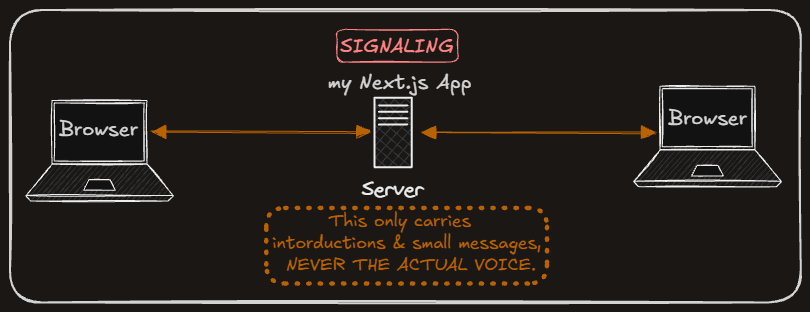
Here's a detail that seems obvious once you say it: there was only ever one server involved, the Next.js app running on my own laptop. My friend, testing the app from his own network, never ran a copy of it himself. His browser just opened a link (through a tunnel, covered in a separate post) that pointed at my laptop.
That one server keeps a simple list in memory: which room codes currently have someone connected, and who. When your browser opens the call page and clicks Join, it opens a live connection to the server saying "I'm in room X." If you're the first person in that room, the server tells you nobody else is there yet, and the screen shows "waiting for the other person." When a second browser connects to the same room code, the server notices both are now present and introduces them to each other.
That introduction is the whole point of this part of the system, called signaling. It's not the actual conversation. It's the handshake that lets the two browsers learn enough about each other to eventually talk directly, which happens a few steps later. Each person's browser is given a random, unique ID when they join (not their name, an actual ID meant only for the server and the two browsers to use for addressing messages) and the server uses that ID to know who a message is meant for.
Step five: the handshake, and how each side learns the other's language
Once both browsers are connected to the server, each one sends the other a small introduction message: their name, and the language they speak. This is the only way either side learns the other's language, and it matters, because the translation direction depends entirely on it. Your browser needs to know the other person's language before it can start translating your voice into it.
Whichever person joined second receives the list of who's already in the room and sends its introduction to them directly. The person who was already waiting receives a notification that someone new arrived and replies with their own introduction. Either way, by the end of this exchange both sides know each other's name, spoken language, and connection ID.
This same message gets sent again any time someone changes their language mid-call, which is how the app updates translation direction on the fly without restarting anything, covered further down.
Step six: creating the actual translation, one per person, one per direction
This is the point where Sanas actually enters the picture. Once your browser knows the other person's language, it creates what the SDK calls an audio processor: an object that takes your microphone stream as input, along with your spoken language and the other person's language, and produces a stream of translated audio as output.
It's worth repeating the point from the very top of this post here, because this is where it becomes concrete: each browser creates exactly one of these, for its own owner's voice, translating outward into the other person's language. Nothing about this processor knows or cares what the other person is saying. It only ever handles one direction.
The processor's translated output doesn't get played back locally. It gets handed off to the next piece of the system, which is responsible for actually getting it to the other person.
Step seven: WebRTC, in plain terms
The translated audio from step six needs to get from your browser to the other person's browser, directly, without routing through my server for every single word spoken (that would be slow, and unnecessary). The browser feature that makes two browsers talk to each other directly is called WebRTC.
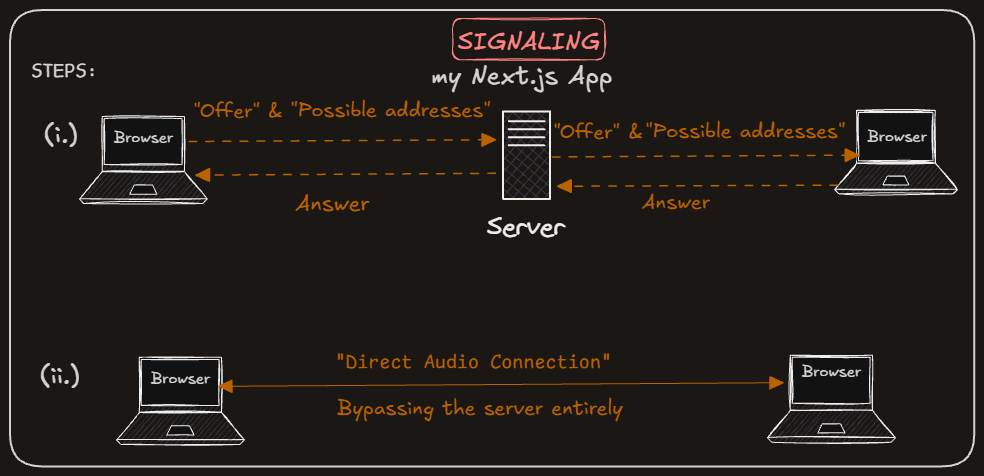
Setting up that direct connection takes a few small exchanges first, all of which travel through the signaling connection from step four, since the two browsers still don't have a way to reach each other any other way yet:
The offer and the answer. One browser writes up a short text description: "I have one audio track to send, in this format." That's called an offer. The other browser reads it and replies with its own version, called an answer: "understood, and here's what I'll be sending too." Neither of these contains any actual audio. They're just descriptions, sent as data.
To avoid both sides accidentally sending an offer at the same time, only one of them is allowed to. The two browsers each compare their own random connection ID against the other's (a plain text comparison, the way you'd alphabetize two words) and whichever one comes out "smaller" is the one that sends the offer. Both sides run the same comparison and always land on the same answer, so there's never a conflict.
Finding a reachable address. Each browser sits behind its own home router, and neither one knows its own address as seen from the outside internet. To find out, each browser asks a public server, called a STUN server (I used a couple of free ones from Google), a very simple question: "what does my connection look like from your side?" The STUN server replies with the address it saw, and the browser passes that along to the other side through the signaling connection, alongside a few other addresses it might be reachable at.
Trying the addresses. Once both sides have exchanged their offer, answer, and a set of possible addresses, the browsers themselves try connecting over each address pair, entirely without any of my code being involved. The first pair that actually works both ways becomes the live connection.
Once that connection exists, and only then, real audio starts flowing directly between the two browsers, no detour through my server.
Step eight: what actually happens when someone speaks
With that connection established, here's the full path a single sentence takes, start to finish.
Say your friend speaks. Their mic picks up their voice, and it goes into their own browser's Sanas processor. Sanas translates it and sends the translated audio back to their processor as an output stream. That output stream is what's attached to the WebRTC connection, so it travels directly to your browser. Your browser receives it and plays it out loud, through a hidden audio element made just for this. It never touches my server at any point in this whole path. My server's involvement ended back at the handshake.
The same thing happens in reverse when you speak, independently and at the same time if you're both talking.
Step nine: showing the words on screen, and the trick that keeps it from duplicating
While the audio plays, the app also shows a running transcript of what's being said, in the language each person actually spoke (not translated text; Sanas returns audio only, with no translated captions).
Sanas reports this to each browser in small pieces as someone talks: some words it's now certain of, and its current best guess at whatever comes next, which can still change. The app shows the certain words in full color and the current guess in a lighter shade, so you can watch a sentence settle in as someone speaks, the same way live captioning does elsewhere.
Here's the part worth calling out. Each browser sends its own transcript across to the other person too, so both sides can see both halves of the conversation, not just their own. But it doesn't send every tiny update. It batches them, sending at most a few times a second, and each time, it sends the entire sentence built so far, not just whatever's new since the last message. That's a deliberate choice: if it only sent the newest fragment each time, and one of those small messages happened to get lost or arrive late, the other person's screen would end up missing a chunk, or worse, showing pieces glued together in the wrong order. Sending the whole running sentence every time means each new message can just fully replace whatever was there before. A dropped message doesn't corrupt anything. The next one fixes the screen.
Step ten: the smaller things that make a call feel finished
A few pieces exist purely to make the call usable in practice, not just technically working.
Muting doesn't touch the microphone connection or the translation session at all. It just silences the audio track being sent, so Sanas receives silence and the other person hears nothing, while everything underneath stays connected and ready the instant you unmute.
Changing your spoken language mid-call doesn't restart anything either. Your own translation processor gets reconfigured in place with the new language, and a fresh introduction message goes out to the other person so their processor knows to expect a new language on your end too. The WebRTC connection itself is untouched.
Leaving the call sends a small goodbye message to the other person and then shuts everything down in order: the connection to the server, the microphone, the translation session, and audio playback. If someone just closes the tab instead of clicking leave, the server notices the dropped connection and lets the other person know the same way.
A tool I built alongside the call: testing solo
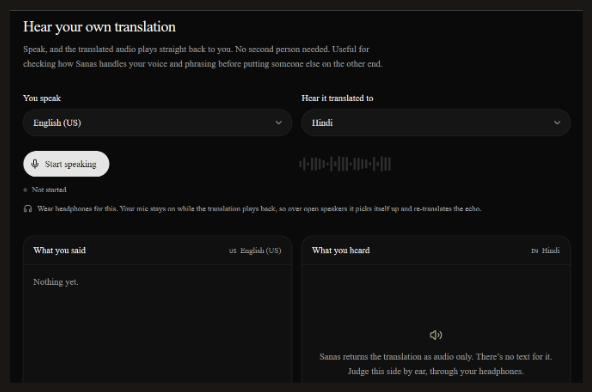
Before ever putting a second person on the other end, I needed a way to check that the translation itself actually sounded right, for my own voice, in my own phrasing. That's a separate page in the app: pick a language you speak and a language to hear it translated into, and the app plays your own translated voice straight back to you, no second person and no WebRTC involved at all. It's the same translation setup as a real call, just with the output played locally instead of sent to someone else, which is normally the exact bug you're trying to avoid in a real call. Here, it's the entire point.
Hope this walk-through was helpful. If you’re experimenting with similar real-time audio pipelines, would love to hear how you’re tackling it.